
Download 3D Pose Maker: Easy Models – 3D pose maker, 3D model, AI pose generator, art reference tool, character design software, 3D character creation, 3D illustration software, 3D model posing, 3D character reference, 3D art software, 3D character modeling, 3D character posing, 3D art reference, 3D character design, 3D modeling tool, 3D art tools, 3D pose software, 3D model creator, 3D character creator, 3D character generator, 3D character reference tool, 3D art reference software, 3D pose generator tool, 3D model generator, 3D character reference software, 3D pose reference tool, 3D model reference, 3D art reference tool, 3D pose creation software, 3D character posing tool, 3D character reference generator, 3D pose reference tool, 3D model reference tool, 3D pose reference software, 3D pose maker software, 3D pose maker tool, 3D pose maker application, 3D pose maker desktop software, 3D pose maker free, 3D pose maker online
Overview
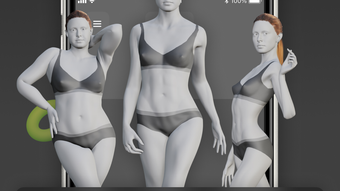
3D Pose Maker: Easy Models is a desktop application designed for artists seeking a reliable and dynamic art reference system. The software enables users to manipulate highly detailed 3D models with precision, offering a practical solution for improving anatomical accuracy and contextual storytelling in visual projects. Targeted at concept artists, illustrators, and designers, it serves as a digital studio for creating lifelike poses and staging scenes with virtual props and backgrounds. The tool aims to streamline the creative workflow by reducing the need for physical references or time-intensive manual sketching.
Developed by 3D Pose Maker, the application supports a range of artistic workflows, from character design to storyboard development. Users can explore diverse models to study human proportions and movement, enhancing their understanding of structure and form. The integration of virtual props allows for richer scene composition, helping artists visualize characters within specific environments. This makes it particularly useful for pre-visualization in animation, game design, and editorial illustration. While the developer did not provide additional background on their development philosophy or team, the product’s focus on realism and usability suggests a strong alignment with professional creative needs.
Key Features & Capabilities
- AI-Powered Pose Generation: Upload a photo and let the AI analyze and replicate the pose on a 3D model, enabling rapid creation of complex or dynamic stances with high consistency.
- Customizable 3D Models: Adjust skin tone, hair color, body type, and other physical attributes to match specific artistic visions or character designs.
- Extensive Model Library: Access a variety of 3D human models with different ethnicities, genders, and physiques to support diverse creative projects.
- Virtual Props and Backgrounds: Integrate digital props and scene elements to enrich context, aiding in storytelling and environmental design.
- Multiformat Export: Export posed models in multiple file formats for seamless integration into other design or animation software.
These features allow artists to build detailed reference materials without the constraints of live models or photography. For instance, a concept artist working on a fantasy game can use the AI pose generator to replicate a dramatic action shot from a reference image, then customize the model’s appearance and place it in a virtual forest scene using available backgrounds. This workflow enhances both efficiency and creative freedom, especially during early-stage ideation and presentation phases.
User Interface, Workflow & Performance
The user interface is structured to prioritize intuitive navigation and workflow efficiency. Core functions such as model selection, pose adjustment, and export settings are accessible through clearly labeled panels and menus. The layout supports a clean, distraction-free workspace, ideal for focused creative sessions. Users can switch between models, apply customizations, and manipulate poses using a combination of sliders, drag-and-drop controls, and AI-driven tools.
Workflow efficiency is enhanced by the integration of the AI pose generator, which reduces the time required to set complex poses manually. The application’s performance is expected to be responsive given the 1.8 GB installation size, though exact performance details were not specified. The developer did not provide resource usage data, so CPU and RAM behavior remain unknown. Stability is assumed to be consistent with standard desktop applications of this category, but real-world testing under various conditions was not documented. General software behavior patterns suggest smooth operation on modern systems, provided the required hardware is met.
Compatibility & System Requirements
3D Pose Maker: Easy Models is available for both Windows and Mac operating systems, supporting a broad range of desktop users. The software is currently at version 1.2.0 and requires approximately 1.8 GB of disk space for installation. While the application is designed for desktop use, specific hardware requirements such as GPU, RAM, or processor specifications were not listed by the developer.
Compatibility information is limited to the operating systems mentioned. The developer did not specify minimum or recommended system configurations, nor did they indicate whether the software supports older versions of Windows or macOS. Users are advised to ensure their system meets general desktop application standards for performance. Exact performance details were not provided, so compatibility with low-end or legacy hardware remains uncertain.
Pros and Cons
Pros
- AI-powered pose generation enables rapid, accurate replication of real-world poses from photos.
- Extensive customization options for skin tone, hair color, and body type enhance creative flexibility.
- Integrated virtual props and backgrounds improve scene context and storytelling potential.
- Supports multiple export formats for use across various design and animation platforms.
- Designed with artists in mind, offering a streamlined workflow for concept development and reference creation.
Cons
- Exact system requirements were not disclosed, making compatibility assessment challenging.
- Resource usage (CPU, RAM) details were not provided, limiting performance planning.
- No information on update frequency or long-term support strategy.
- Price point of $49.99 may be considered high for casual users or students.
- Limited availability of detailed tutorials or onboarding materials in the provided information.
FAQ Section
Is 3D Pose Maker: Easy Models compatible with both Windows and Mac?
Yes, the software is available for both Windows and Mac operating systems, as stated in the official release details.
Can I use this software offline?
The application is designed as a desktop tool, suggesting it functions without an internet connection after installation. However, the AI pose generation feature may require online processing, depending on implementation.
Is the software secure to download and install?
As a desktop application from a known developer, 3D Pose Maker, it is expected to be secure. Users should download from official sources to ensure integrity.
What kind of license does 3D Pose Maker: Easy Models use?
The software is sold as a one-time purchase at $49.99. The exact license type (e.g., perpetual, subscription) was not specified in the provided information.
How often are updates released?
Release details indicate version 1.2.0 was launched on March 15, 2024. The update frequency is not documented, so users should check the developer’s official site for the latest release notes.
Final Thoughts + CTA
3D Pose Maker: Easy Models stands out as a powerful tool for artists who rely on accurate and customizable 3D references. Its AI-driven pose generation, combined with extensive customization and scene-building features, offers a significant advantage in concept development and character design. While some technical details remain unspecified, the software’s focus on usability and creative control makes it a compelling choice for professionals and serious hobbyists alike.
For concept artists, illustrators, and designers working in animation or game development, this tool can dramatically reduce reference preparation time and improve visual accuracy. The ability to transform a simple photo into a fully posed 3D model is a game-changer for rapid ideation and presentation.
Download 3D Pose Maker: Easy Models now to elevate your creative workflow with advanced 3D posing and reference capabilities.







